Showing posts with label software. Show all posts

Top 10 Most Useful Windows Programs to Have On Hand

Top 10 Incredibly Useful Windows Programs to Have On Hand 

Some apps are essential, and you use them every day. Everyone knows their names: Firefox, VLC, 7-Zip, and so on. However, there’s another class of app that gets less attention: the apps that are insanely useful to have in your back pocket on the rare occasions you need them. Here are 10 of our favorites.

10. Speccy

Top 10 Incredibly Useful Windows Programs to Have On Hand 

Maybe you’ve forgotten what kind of RAM you bought, or want a quick glance at your CPU’s temperature. Speccy scans your machine and gives you a complete rundown of everything, from model numbers to temperatures, fan speeds, S.M.A.R.T. status, and...well, pretty much anything else you can think of. It’s also available in portable form, so you don’t have to install anything—just stick it in a folder for when you really need it. For an alternative, check out HWiNFO.

9. Ultimate Windows Tweaker

Top 10 Incredibly Useful Windows Programs to Have On Hand 

When you first install Windows, you probably get everything set up just the way you like it, including all your favorite little Registry hacks and unsupported tweaks. You might even discover new ones later and try them out. Apps like Ultimate Windows Tweaker make this a lot easier, and they’re useful to keep around later if you start incorporating new things into your workflow. Its list of features is endless, allowing you to tweak the tiniest features in the taskbar, Windows Explorer, the lock screen, and anything else you could imagine. Download it once and keep it forever (and as always, back up before you start tweaking your system).

8. Stress Testing Utilities

Top 10 Incredibly Useful Windows Programs to Have On Hand 

Overclockers are probably very familiar with stress testing utilities like Prime95, LinX, and AIDA64. If you’ve overclocked your CPU, you should definitely keep these around, but they can be useful for non-overclockers too. When your processor is having issues, it can be difficult to diagnose. If some of your apps are crashing, a stress test like Prime95 can help you figure out whether your CPU is the problem (or whether it’s something else). Many folks also recommend giving a new computer a stress test to make sure there aren’t any problems. Most of these are also portable, so you can throw them in a folder and start them up when you need them.

7. MalwareBytes, VirusTotal, and AdwCleaner

Top 10 Incredibly Useful Windows Programs to Have On HandWe put these in the same category since they all protect you from unwanted programs, but they’re each useful in their own right. You probably have a good antivirus program running all the time, but no antivirus program catches everything—so it’s useful to have a secondary program to check once in awhile. MalwareBytes is great because it only works on-demand, which means it won’t conflict with your always-running antivirus tool. The VirusTotal Uploader, on the other hand, lets you scan any individual file with over 50 antivirus tools at once, so it’s great if you’ve downloaded something you think might be fishy. Lastly, if you’ve accidentally installed an annoying toolbar on your system that just won’t go away, AdwCleaner will help you get rid of it.

6. Magical Jelly Bean KeyFinder

Top 10 Incredibly Useful Windows Programs to Have On Hand
Ever had to reinstall a program, but couldn’t find your product key? Magical Jelly Bean KeyFinder will search your PC for installed programs, and—if they have a product key—show them to you, so you can write it down and use it the next time you reinstall. Note: this one contains some toolbars and such upon installation, so be sure to use the custom installation to avoid the crapware.

5. Process Explorer

Top 10 Incredibly Useful Windows Programs to Have On Hand 

The Windows Task Manager can show you a lot of information about what programs are running, and usually it does what you need it to. But on the rare occasions you need more information—like if you’re trying to figure out which program is using your webcam, for example—you need Process Explorer. Process Explorer is one of the many Task Manager alternatives out there, offering information on what files are currently in use, what hardware, and what each program is doing. If the regular Task Manager isn’t giving you the info you need, Process Explorer will.

4. UNetbootin and YUMI

Top 10 Incredibly Useful Windows Programs to Have On Hand 

Even if you’re a diehard Windows user, Linux can be really useful from time to time—especially for troubleshooting. Traditionally, Linux distros and other troubleshooting tools come in the form of live CDs, but if you don’t have a CD drive, UNetbootin is a seriously handy tool. It can turn nearly any ISO into a bootable flash drive. Even better is YUMI, which lets you put multiple live CDs on one flash drive—meaning you can combine all your favorite rescue discs, Linux distros, and other tools and put them in your pocket.

3. Wireless Network Watcher (and Other Network Tools)

Top 10 Incredibly Useful Windows Programs to Have On Hand 
Need to see a list of all the computers on your network, along with IP addresses, MAC addresses, and other information? Whether you’re planning your network or think someone’s stealing your Wi-Fi, Wireless Network Watcher is a handy tool to have around. Despite its name, it works over wired networks, too. Of course, we also recommend checking out all of NirSoft’s network tools—which one you use depends on what you’re trying to troubleshoot, but they’re all pretty awesome.

2. WinDirStat

Top 10 Incredibly Useful Windows Programs to Have On Hand 
We all reach that fateful day at some point: when your computer tells you its running out of space. Not sure where it’s all going? WinDirStat will tell you. It scans all of your disks and shows you the biggest folders, which file types are taking up space, and more. If you’ve tried the usual things (like Disk Cleanup) and are still coming up short, WinDirStat is the next step in the disk cleaning process.

1. Sandboxie

Top 10 Incredibly Useful Windows Programs to Have On Hand 

Let’s admit it: sometimes, even though we know it’s wrong, we all open the occasional sketchy program or file. We’re not judging, but if you’re going to do it, at least use protection. Enter Sandboxie, which lets you run programs independent of the rest of your system. That way they can’t infect, access, or otherwise interfere with your Windows installation. It’s also great for testing apps you aren’t sure of or running multiple instances of an app that won’t let you, so it’s fun for the whole family.

DeadLine's Virus Maker 1.8.5(Free Download)

Hello !
DeadLine's Virus Maker 1.8.5 is a virus maker that I made because I do not trust all the other virus makers that are out there on the net. I worked on this for 8+ hours in total.
This application lets you create virusses, and you do not need to be a computer "geek" to do this. All you need, is this tool.

Features:
* Show a messagebox on startup
* Add to windows startup
* Close MSN
* Close Skype
* Close Yahoo
* Disable mouse
* Force shutdown
* Force restart
* Infinite beeping
* Infinite messageboxes
* Disconnect from the internet
* Disable firewall
* Disable CMD
* Disable taskmanager
* Disable regedit
* Random mouse movement
* Random keyboard keys sent
* Disable notepad
* And more !

Screenshot:


Credit:DeadLine From HF

USA+International Free SMS + Email Bomber

SCREEN SHOT:


DOWNLOAD:
http://adf.ly/CuiaK


PASSWORD:
openpass

VIRUSTOTAL

Super Virus Builder - Create your virus in seconds ! [MEDIAFIRE]


Information:
The next generation of virus builders has finally arrived. Ultimate Virus Builder offers you more than 50 options to customize your virus to your likings. You can even select your own icon for your virus ! Not only does this tool allow you to create your own virusses, it can also help you spoof the extension of any file with the built in extension spoofer ! Ultimate Virus Builder has an automatic update system, so you’ll never have to worry about downloading the latest version, isn’t that awesome? You don’t need to be a computer ‘geek’ to create virusses, all you need is Ultimate Virus Builder.
Options:
  • Custom message on execution
  • Add to startup
  • Disable clipboard
  • Disable taskmanager
  • Disable CMD
  • Disable System Repair
  • Disable Msconfig
  • Disable Explorer
  • Disable Regedit
  • Switch mouse buttons
  • Hide taskbar
  • Disconnect from the internet
  • Many more !

Portable AutoCAD 2010 (2D and 3D CAD)

Portable AutoCAD 2010 (2D and 3D CAD)


Portable AutoCAD 2010 (2D and 3D CAD)

English | Pc | Windows | Size: 571.41 Mb

Genre: Portable - Graphic Software

FileServe FileSonic BitShare links


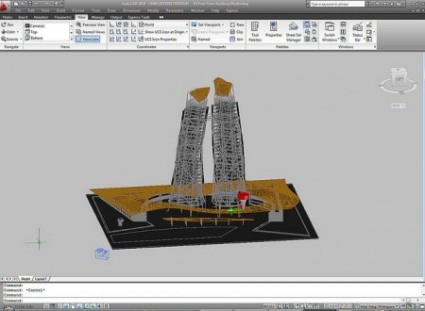
Design and shape the world around you with the powerful, flexible features found in AutoCAD design and documentation software, one of the world s leading 2D and 3D CAD tools. Speed documentation, share ideas seamlessly, and explore ideas more intuitively in 3D. With thousands of available add-ons, AutoCAD software provides the ultimate in flexibility, customized for your specific needs. It s time to take design further.


AutoCAD software enables you to create and explore ideas like never before. With AutoCAD software Autodesk has just one goal in mind: increasing your productivity. From conceptual design through drafting and detailing, AutoCAD is all you need to create, visualize, document, and share your ideas. AutoCAD combines the familiar AutoCAD commands and user interface that you already know with an updated design environment, giving you the power to shape and explore your ideas like never before.


AutoCAD boosts efficiency with customizable and extensible user interface enhancements that increase overall drafting productivity by decreasing the number of steps to reach a command. Newly designed, innovative features simplify working with layers and help make new users productive as quickly as possible. Easy-to-use navigation tools make finding your way around 3D models a snap. Move to new highs of productivity with AutoCAD software.


Make efficiency a daily part of the job with AutoCAD software. The drafting, detailing, and conceptual design leader is showing the way once again. Meticulously refined with the drafter in mind, AutoCAD propels day-to-day drafting forward with features that increase speed and accuracy while saving time. Annotation scaling and layer properties per viewport minimise workarounds, while text and table enhancements and multiple leaders help deliver an unmatched level of aesthetic precision and professionalism. Always innovative, the existing AutoCAD tools for conceptual design and visualisation work with a new toolset to deliver virtually instant productivity, making efficiency a daily part of the job.


Document. Create your designs more intuitively, more efficiently, and faster than ever before.


Communicate. Present and share your designs more seamlessly, more accurately, and more powerfully.


Explore. Now you can turn ideas, regardless of shape or size, into a 3D CAD model to help take your designs further.


Customize. Make AutoCAD software work for you in ways you never thought possible


Homepage - http://www.autodesk.com/


Portable AutoCAD 2010 (2D and 3D CAD)


The links of FILESERVE.com


MirRor Links - FiLeSoNic.com


MirRor Links - BitShare.com


All links are InterChangable. It means you can download any part of the archive from any host, and can extract them without problem!

Portable AutoCAD 2010 (2D and 3D CAD)


Portable AutoCAD 2010 (2D and 3D CAD)


Portable AutoCAD 2010 (2D and 3D CAD)

English | Pc | Windows | Size: 571.41 Mb

Genre: Portable - Graphic Software

FileServe FileSonic BitShare links


Design and shape the world around you with the powerful, flexible features found in AutoCAD design and documentation software, one of the world s leading 2D and 3D CAD tools. Speed documentation, share ideas seamlessly, and explore ideas more intuitively in 3D. With thousands of available add-ons, AutoCAD software provides the ultimate in flexibility, customized for your specific needs. It s time to take design further.


AutoCAD software enables you to create and explore ideas like never before. With AutoCAD software Autodesk has just one goal in mind: increasing your productivity. From conceptual design through drafting and detailing, AutoCAD is all you need to create, visualize, document, and share your ideas. AutoCAD combines the familiar AutoCAD commands and user interface that you already know with an updated design environment, giving you the power to shape and explore your ideas like never before.


AutoCAD boosts efficiency with customizable and extensible user interface enhancements that increase overall drafting productivity by decreasing the number of steps to reach a command. Newly designed, innovative features simplify working with layers and help make new users productive as quickly as possible. Easy-to-use navigation tools make finding your way around 3D models a snap. Move to new highs of productivity with AutoCAD software.


Make efficiency a daily part of the job with AutoCAD software. The drafting, detailing, and conceptual design leader is showing the way once again. Meticulously refined with the drafter in mind, AutoCAD propels day-to-day drafting forward with features that increase speed and accuracy while saving time. Annotation scaling and layer properties per viewport minimise workarounds, while text and table enhancements and multiple leaders help deliver an unmatched level of aesthetic precision and professionalism. Always innovative, the existing AutoCAD tools for conceptual design and visualisation work with a new toolset to deliver virtually instant productivity, making efficiency a daily part of the job.


Document. Create your designs more intuitively, more efficiently, and faster than ever before.

<div class="post hentry">
<a name="8029558300718162892">


Copyright @ 2013 OPEN HACKING.